
Introduction
Obsidian is a note-taking application suitable for creating a knowledge base for web application developers. Obsidian, especially when using many plugins, creates a very effective environment for writing, collecting, and searching for notes. If we want to publish these notes on a web blog, we need to solve the bridging between Obsidian and Laravel. of the forms is to create a suitable export from Obsidian and solve the import into the resulting form when creating posts in Laravel.
Selected structure of Obsidian article zip file as article/note export from the Obsidian environment:
250618_1448_Blade_-_using_custom_class_code.zip
├── content.md
├── Pasted%20image%2020220223085415.png
└── Pasted%20image%2020220221100546.png
....
The images Pasted%20**.png are inserted by Obsidian when editing the article with the corresponding link in the markdown text. The creation of the final export zip file is created by a small separate php application.
Here is a specific answer to a common editorial problem: writing long-form content in Obsidian is convenient, but publication still happens inside the Laravel admin panel. Instead of rebuilding the post editor around Markdown, the Laravel app adds a focused import path on the post update screen. An editor picks a ZIP file from storage, chooses how the imported HTML should be merged with the current post body, and lets the backend normalize both Markdown and pasted images into the blog's existing content model.
Implementation in Laravel 11 application
Overview
- Upload of obsidian article zip file by unisharp/laravel-filemanager (file upload/editor intended for use with Laravel 5 to 12 and CKEditor / TinyMCE - here used ver.2.12.1)
- Create/edit post content with possibility to import obsidian article zip file from Filemanager
What makes this implementation worth documenting is that it is deliberately narrow. It is not a generic file upload feature, and it is not a full Obsidian vault synchronizer. The import starts from the post dashboard UI, passes through a dedicated admin route, rewrites a file-manager URL back into a public-disk path, extracts the ZIP into a temporary directory, converts Markdown file into HTML, imports matching images into the blog image layout, and stores the result into a post content record with a single-level archive in old_content.
Upload of obsidian article zip file
This project uses `unisharp/laravel-filemanager` as a lightweight media library and file browser for the admin area. In general terms, it provides a ready-made interface for uploading, browsing, selecting, cropping, resizing, and reusing files.
It works on the `public` disk, and organizes shared assets into categories such as general files, images, videos, and import ZIP files.
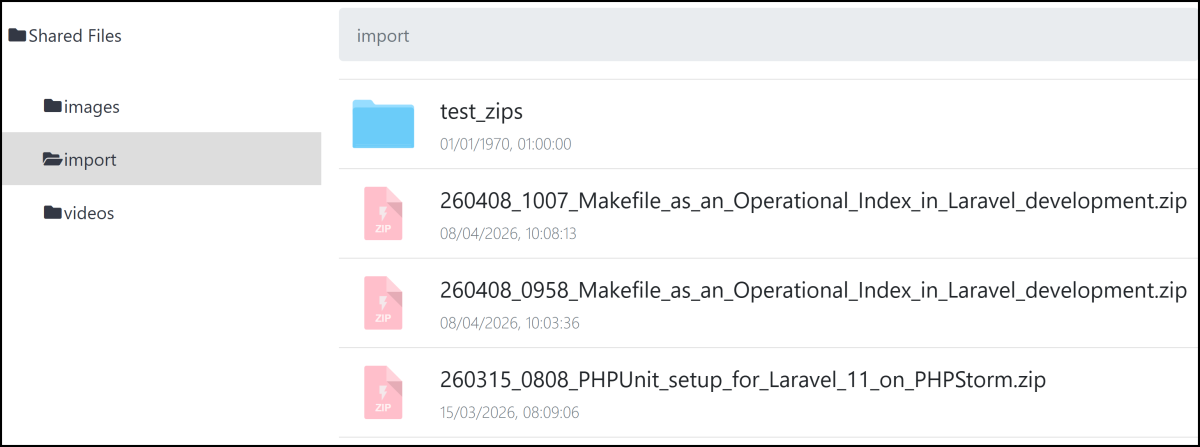
Import/Update Post Content with Obsidian article
The import UI lives directly on the admin post edit page. It is not part of the normal post update form. Instead, the page renders a separate "Content Import" card with its own PUT form targeting the import route for the current post.
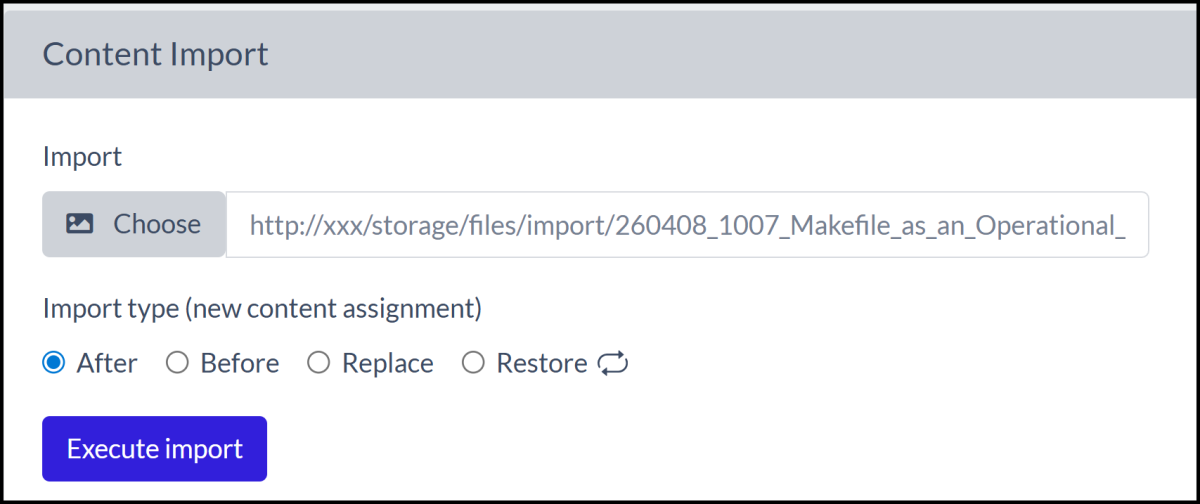
Initial archive before importing
On the normal import path, the controller first copies the current content into old_content. That makes the import effectively a reversible operation. The system does not store multiple revisions; it stores the current body and archived body.
The import supports append, prepend, and replace operations
The meaning of import_type is encoded in both the controller and the radio buttons on the page:
- appends imported content after the current body.
- prepends imported content before the current body.
- replaces the current body entirely.
- restores the archived body.
There is no enum and no in:1,2,3,4 validation rule. import_type is validated as numeric in app/Http/Requests/ImportRequest.php. That keeps the request contract loose, but it also means invalid numeric modes are filtered by controller behavior, not by validation.
The Service Layer Treats the ZIP as a Flat Import Bundle
The controller delegates the actual import work to app/Services/ImportObsidianService.php. The entry point is loadObsidianZipFile():
$zipService = new ZipProcessingService();
$imageService = new ImageService;
$content = '';

$absTempUnpackDir = $zipService->loadZipFile($relImportPath, $storage);
$files = File::files($absTempUnpackDir);

foreach ($files as $file) {
    $fileExtension = $file->getExtension();

    switch (strtolower($fileExtension)) {
        case 'md':
            $content = $this->transformContent($file->getContents());
            break;
        case 'png':
        case 'jpg':
        case 'jpeg':
            $imageService->resizeWithCrop($file->getRealPath(), $storage, true);
            break;
    }
}

File::deleteDirectory($absTempUnpackDir, true);
rmdir($absTempUnpackDir);

return $content;
This service is intentionally simple, but the details matter.
This is a good example of a feature that works because its scope is constrained. The ZIP is treated as a flat bundle containing relevant Markdown document plus zero or more pasted images.
ZIP Extraction Happens on the Local Filesystem First
The extraction step is isolated in custom ZipProcessingService. That service checks existence on the selected storage disk, resolves an absolute path, creates a UUID-named temporary directory in storage, and extracts via ZipArchive.
if (! $storage->exists($relImportPath)) {
    throw new ZipNotFoundStorageException("Zip file not found on Storage : {$relImportPath}");
}

$absZipFilePath = $storage->path($relImportPath);
$unpackedDirName = Str::uuid()->toString();
$absTempDir = storage_path('app/temp_zip_unpack');

$zip = new ZipArchive;
if ($zip->open($absZipFilePath) === true) {
    $absTempUnpackPath = $absTempDir . '/' . $unpackedDirName;

    if (! $zip->extractTo($absTempUnpackPath)) {
        $zip->close();
        throw new ZipNotExtractedException(...);
    }

    $zip->close();

    return $absTempUnpackPath;
}

throw new ZipOpenFileException(...);
Extraction happens in a controlled local path rather than trying to read ZIP members directly from a storage abstraction. That avoids a class of streaming and permission problems, and it makes the next phase trivial because ImportObsidianService can iterate real files on disk.
Markdown Transformation Is Purpose-Built for This Blog's HTML
The transformation logic in ImportObsidianService is not a general Obsidian parser. It is a targeted normalization pass over the HTML produced by the Markdown converter.
$output = Markdown::convert($content)->getContent();
$output = str_replace('<code class="language-php">', '<code>', $output);
$output = str_replace('<pre><code>', '<pre>', $output);
$output = str_replace('</code></pre>', '</pre>', $output);
$output = preg_replace('#(.*)#', '<strong><em>${1}</em></strong>', $output);
$output = preg_replace('#(\<table)([^>]*>)#', '${1} class="table-responsive" ${2}', $output);
$output = preg_replace('#\!\[\[[^\]]*]]#', '', $output);
Code blocks are simplified from the Markdown renderer's pre/code form into bare pre blocks, and PHP language classes are stripped. That aligns imported HTML with the blog's existing frontend expectations rather than preserving source-language annotations from Obsidian.
Obsidian's highlight syntax is converted into strong plus em. That is not semantic highlighting in the HTML sense; it is a visual fallback using tags the existing frontend already understands.
Tables receive class="table-responsive" directly on the table tag. That is a Bootstrap-oriented compatibility move, but it also means responsiveness is being modeled as a table class, not as the more common wrapper div approach.
Internal Obsidian embeds of the form are stripped entirely. Unresolved note links do not become placeholders or broken references in the published post; they disappear. The goal is not to preserve every Obsidian construct. The goal is to end up with publishable blog HTML.
Pasted Images Are Rewritten into the Blog's Public Storage Layout
The most project-specific part of the transformation is the image rewrite callback in ImportObsidianService:
$output = preg_replace_callback(
    '#(<img\s+src=")(.*)(Pasted[^"]*)(\")([^>]*>)#',
    function ($matches) {
        $part1 = '/storage/files/images/';
        $part2 = str_replace('Pasted%20image%20', 'pasted-', $matches[3]);

        return '<div style="margin:10px;">'
            . $matches[1] . $part1 . $part2 . $matches[4]
            . ' class="lazy img-fluid img-post img-sizing" '
            . $matches[5]
            . '</div>';
    },
    $output
);
This callback assumes the HTML contains image sources that include Obsidian-style Pasted image filenames, URL-encoded as Pasted%20image%20.... It rewrites those references into the blog's public image directory, normalizes the filename prefix to pasted-, and adds the CSS classes the frontend expects.
That works because the image files themselves are imported and normalized by ImageService:
$imageName = str_replace('Pasted%20image%20', 'pasted-', basename($absSourcePath));

if ($isImport) {
    $destinationPath = $storage->path('files/images/' . $imageName);
}

$destinationCatPath = $storage->path('files/images/cat/' . $imageName);

$img = Image::read($absSourcePath);
$width = $img->width();
$height = $img->height();

if ($width > 1200 || $height > 1200) {
    $img->scaleDown(1200, 1200)->save($destinationPath);
    $img->cover(300, 300)->save($destinationCatPath);
} else {
    $img->save($destinationPath);
    if ($width > 300 || $height > 300) {
        $img->cover(300, 300)->save($destinationCatPath);
    }
}
Oversized images are scaled down to a maximum of 1200 pixels in either dimension. The cat variant is produced as a 300x300 cover image when the source is large enough. This mirrors the rest of the application's image conventions rather than inventing an Obsidian-specific asset strategy.