
The Migration Strategy: Self-Hosted TinyMCE with Static Copy
Instead of fighting Vite's module bundler, the solution uses a hybrid approach: TinyMCE is loaded as a traditional global script, while the configuration runs through Vite.
Step 1: Remove TinyMCE from npm, Use Self-Hosted Distribution
Download TinyMCE 8 Community (GPL) from the official download page and place the full distribution under resources/tinymce/:
resources/tinymce/
├── icons/
│   └── default/
├── langs/
├── models/
├── plugins/
│   ├── accordion/
│   ├── advlist/
│   ├── anchor/
│   ├── autolink/
│   ├── autoresize/
│   ├── autosave/
│   ├── charmap/
│   ├── code/
│   ├── codesample/
│   ├── directionality/
│   ├── emoticons/
│   ├── fullscreen/
│   ├── help/
│   ├── image/
│   ├── importcss/
│   ├── insertdatetime/
│   ├── link/
│   ├── lists/
│   ├── media/
│   ├── nonbreaking/
│   ├── pagebreak/
│   ├── preview/
│   ├── quickbars/
│   ├── save/
│   ├── searchreplace/
│   ├── table/
│   ├── visualblocks/
│   ├── visualchars/
│   └── wordcount/
├── skins/
├── themes/
├── tinymce.d.ts
├── tinymce.min.js
├── license.md
└── notices.txt
Why this approach? TinyMCE's plugin loader dynamically requests JS files relative to its base URL. When bundled through Vite, these dynamic imports get mangled or tree-shaken. A self-hosted distribution keeps TinyMCE's internal asset resolution intact.
Step 2: Configure Vite with vite-plugin-static-copy
Install the static copy plugin:
npm install -D vite-plugin-static-copy
Then configure vite.config.js to copy TinyMCE assets to the build output and register the TinyMCE config as a separate entry point:
// vite.config.js (Laravel 11)
import { defineConfig } from 'vite';
import laravel from 'laravel-vite-plugin';
import { viteStaticCopy } from 'vite-plugin-static-copy';
import path from 'path';

export default defineConfig({
    plugins: [
        laravel({
            input: [
                'resources/js/admin.js',
                'resources/sass/frontend.scss',
                'resources/sass/extend.scss',
                'resources/js/tinymce-config.js'    // <-- separate entry point
            ],
            refresh: true,
        }),
        viteStaticCopy({
            targets: [
                {
                    src: 'resources/tinymce/**/*',   // <-- copy entire TinyMCE distribution
                    dest: 'tinymce'                  // <-- to public/build/tinymce/
                }
            ]
        })
    ],
    css: {
        preprocessorOptions: {
            scss: {
                api: 'modern-compiler',
                additionalData: ``,
                silenceDeprecations: [
                    'legacy-js-api',
                    'import',
                    'global-builtin',
                    'color-functions'
                ],
                loadPaths: ['node_modules', 'node_modules/@coreui']
            }
        }
    },
    resolve: {
        alias: {
            '~': path.resolve(__dirname, 'node_modules')
        }
    }
});
Key points:
viteStaticCopycopies the full TinyMCE distribution topublic/build/tinymce/during buildtinymce-config.jsis registered as a separate Vite entry point, not bundled insideadmin.js- This means pages that don't need the editor don't load the config
Step 3: Update the Blade Layout — Two-Step Loading
This is where the hybrid approach comes together. In the admin layout:
<!-- resources/views/layouts/admin.blade.php -->

<!-- Head section: load admin scripts via Vite -->
@vite(['resources/js/admin.js'])

<!-- ... page content ... -->

<!-- Bottom of body: load TinyMCE as a traditional script FIRST -->
<script src="{{ asset('build/tinymce/tinymce.min.js') }}"></script>
<!-- THEN load the config via Vite -->
@vite(['resources/js/tinymce-config.js'])
@stack('scripts')
Why this order matters:
tinymce.min.jsis loaded as a regular<script>tag — it registerstinymceas a global variabletinymce-config.jsis loaded via Vite (as an ES module) — it accesses the globaltinymceand callstinymce.init()- The config uses
DOMContentLoadedas a safety net to ensure the DOM is ready
Compare with the old Laravel 8 approach, where everything was bundled into a single admin.js:
<!-- Old Laravel 8 layout -->
<script src="{{ asset('js/admin.js') }}" defer></script>
Step 4: Rewrite the Editor Configuration for TinyMCE 8
Here's the complete new configuration:
// resources/js/tinymce-config.js (Laravel 11 / TinyMCE 8.3.1)

document.addEventListener('DOMContentLoaded', function() {
  if (typeof tinymce === 'undefined') {
    console.error('TinyMCE is not loaded!');
    return;
  }

  const editorConfig = {
    path_absolute: '/auth/',
    selector: 'textarea#content',

    // NEW in TinyMCE 8: required for community (GPL) edition
    license_key: 'gpl',
    promotion: false,
    false,

    // Simplified plugin list — many v5 plugins merged into core or removed
    plugins: 'link autolink code codesample table lists image',

    // Toolbar: "styleselect" → "blocks" in v8
    toolbar: 'undo redo | blocks | bold italic | alignleft aligncenter alignright ' +
             '| indent outdent | bullist numlist | code | link | codesample | table | image',

    link_default_protocol: 'http',

    // NEW: codesample plugin with Prism.js integration (replaces custom templates)
    codesample_global_prismjs: true,
    codesample_languages: [
      { text: 'HTML/XML', value: 'markup' },
      { text: 'JavaScript', value: 'javascript' },
      { text: 'CSS', value: 'css' },
      { text: 'PHP', value: 'php' },
      { text: 'Ruby', value: 'ruby' },
      { text: 'Python', value: 'python' },
      { text: 'Java', value: 'java' },
      { text: 'C', value: 'c' },
      { text: 'C#', value: 'csharp' },
      { text: 'C++', value: 'cpp' }
    ],

    // These options remain unchanged from v5
    fullscreen_native: true,
    visualblocks_default_state: false,
    end_container_on_empty_block: true,
    block_unsupported_drop: true,
    relative_urls: false,
    height: "250",

    // NEW: responsive defaults for images and tables
    image_advtab: true,
    image_class_list: [{
      title: "Responsive",
      value: "lazy img-fluid img-post"
    }],
    table_class_list: [{
      title: 'Responsive',
      value: 'table-responsive'
    }],

    // Laravel File Manager integration — nearly identical to v5
    file_picker_callback: function(callback, value, meta) {
      const x = window.innerWidth || document.documentElement.clientWidth ||
                document.getElementsByTagName('body')[0].clientWidth;
      const y = window.innerHeight || document.documentElement.clientHeight ||
                document.getElementsByTagName('body')[0].clientHeight;

      let cmsURL = editorConfig.path_absolute +
                   'laravel-filemanager?editor=' + meta.fieldname;
      if (meta.filetype === 'image') {
        cmsURL = cmsURL + "&type=Images";
      } else {
        cmsURL = cmsURL + "&type=Files";
      }

      tinymce.activeEditor.windowManager.openUrl({
        url: cmsURL,
        title: 'Filemanager',
        width: x * 0.8,
        height: y * 0.8,
        resizable: "yes",
        close_previous: "no",
        (api, message) => {
          callback(message.content);
        }
      });
    },
  };

  tinymce.init(editorConfig);
});
Key Configuration Changes Explained
1. License key and UI options
// TinyMCE 8 REQUIRES this for GPL/community usage
license_key: 'gpl',
promotion: false,    // Hide "Upgrade" prompts
 false,   // Skip first-run tutorial overlay
Without license_key: 'gpl', TinyMCE 8 shows a persistent warning banner in the editor.
2. Plugin list — from 20+ to 7
// TinyMCE 5 (many plugins that are now removed or merged into core)
plugins: [
    "advlist autolink lists link image charmap print preview hr anchor pagebreak",
    "searchreplace wordcount visualblocks visualchars code fullscreen",
    "insertdatetime media nonbreaking save table directionality",
    "emoticons template paste textpattern"
]

// TinyMCE 8 (streamlined — core handles paste, textpattern, hr, etc.)
plugins: 'link autolink code codesample table lists image'
3. Toolbar — styleselect → blocks
// TinyMCE 5
toolbar: "insertfile undo redo | styleselect | bold italic | ..."

// TinyMCE 8
toolbar: "undo redo | blocks | bold italic | ..."
The styleselect dropdown was renamed to blocks in TinyMCE 6.
4. Code samples — from manual templates to built-in codesample plugin
In TinyMCE 5, code blocks were implemented using custom templates with highlight.js classes:
// TinyMCE 5: manual code block templates
templates: [
    {
        title: "PHP",
        description: "A PHP HLJS Code Block",
        content: "<h4>PHP</h4><pre><code class='php hljs'>a = 1;</code></pre>",
    },
    // ...
]
In TinyMCE 8, the codesample plugin provides a proper code insertion dialog with syntax highlighting via Prism.js:
// TinyMCE 8: native codesample with Prism.js
codesample_global_prismjs: true,
codesample_languages: [
    { text: 'HTML/XML', value: 'markup' },
    { text: 'JavaScript', value: 'javascript' },
    { text: 'PHP', value: 'php' },
    // ...
]
This also means adding Prism.js CSS and JS to your frontend layout for rendering code blocks in published posts:
<link rel="stylesheet" type="text/css" href="{{ asset('css/prism.css') }}">
<script src="{{ asset('js/prism.js') }}" defer></script>
5. File picker callback — minimal changes
The file_picker_callback for Laravel File Manager integration is nearly identical between v5 and v8. The change is using const/let instead of var and strict equality (===) — JavaScript modernization, not TinyMCE API changes:
// Both versions use the same windowManager.openUrl() API
tinymce.activeEditor.windowManager.openUrl({
    url: cmsURL,
    title: 'Filemanager',
    width: x * 0.8,
    height: y * 0.8,
    resizable: "yes",
    close_previous: "no",
    (api, message) => {
        callback(message.content);
    }
});
Step 5: Decouple TinyMCE from the Admin Bundle
In the old setup, admin.js loaded everything including TinyMCE:
// resources/js/admin.js (Laravel 8) — TinyMCE bundled here
import bsCustomFileInput from 'bs-custom-file-input';
bsCustomFileInput.init();
require('./scripts/tinymce');     // <-- loaded on every admin page
require('./scripts/sidebar');
require('./scripts/proper-url');
require('./scripts/hidden-form');
require('./scripts/post-date');
In the new setup, admin.js is lean — TinyMCE lives in its own entry point:
// resources/js/admin.js (Laravel 11) — no TinyMCE
import bsCustomFileInput from 'bs-custom-file-input';
bsCustomFileInput.init();
import './scripts/sidebar';
import './scripts/proper-url';
import './scripts/hidden-form';
import './scripts/post-date';
TinyMCE loads on admin pages that use the admin layout (which includes the <script> tag and @vite directive for the config). This is a natural separation that reduces unnecessary JS on pages that don't need the editor.
Common Pitfalls & Gotchas
"Skin not found" Error
Symptom: Console error about missing skin files, editor renders without styling.
Cause: vite-plugin-static-copy didn't copy the assets, or the asset() path doesn't match the actual output directory.
Fix: Verify that public/build/tinymce/skins/ exists after running npm run build. The dest: 'tinymce' in viteStaticCopy must match the path in asset('build/tinymce/tinymce.min.js').
"tinymce is undefined"
Symptom: Console error in tinymce-config.js — the global tinymce variable doesn't exist.
Cause: Vite modules load asynchronously. If the <script src="tinymce.min.js"> appears after the @vite directive, or both load in parallel, the config may execute before TinyMCE is ready.
Fix: Ensure the loading order in your Blade layout is correct:
<!-- FIRST: load TinyMCE core as a blocking script -->
<script src="{{ asset('build/tinymce/tinymce.min.js') }}"></script>
<!-- SECOND: load config via Vite -->
@vite(['resources/js/tinymce-config.js'])
The DOMContentLoaded wrapper in the config provides additional safety.
"Plugin not found" Errors
Symptom: Console warnings about plugins that can't be loaded.
Cause: Using TinyMCE 5 plugin names that no longer exist in v8.
Fix: Remove all deprecated plugin names from your plugins option. See the comparison table in Section 2. Key removals: print, hr, paste, template, textpattern, textcolor, colorpicker, contextmenu.
Missing license_key: 'gpl'
Symptom: A yellow notification bar appears at the top of the editor saying "This domain is not registered."
Fix: Add license_key: 'gpl' to your editor configuration. This is mandatory for the community (open-source) edition of TinyMCE 8.
Vite Dev Server vs Production Build
During development (npm run dev), vite-plugin-static-copy copies assets to Vite's dev server, and asset('build/tinymce/tinymce.min.js') may not resolve correctly since assets are served from the Vite dev server.
Workaround: Make sure to run npm run build at least to populate public/build/tinymce/. The asset() helper resolves to the public/ directory regardless of whether the Vite dev server is running.
Summary: Before vs After
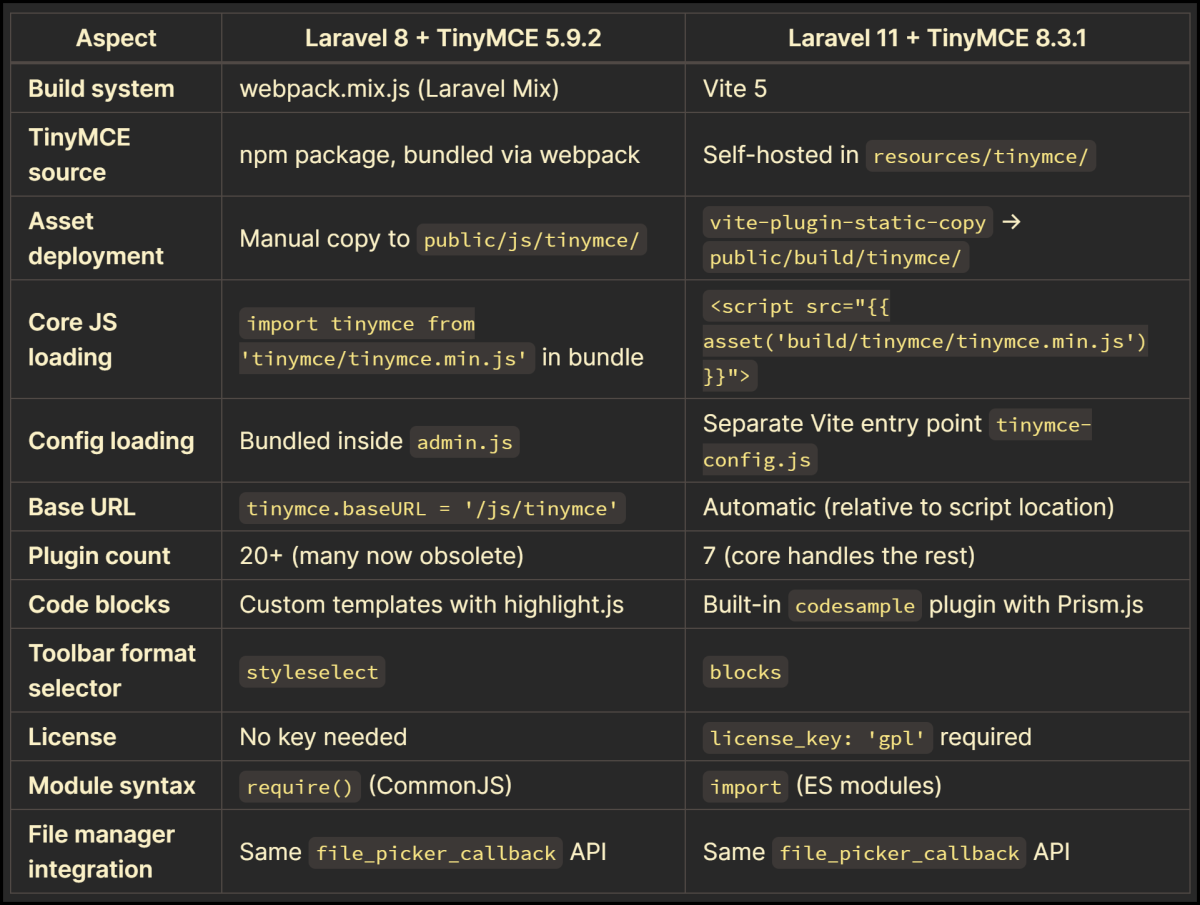
The core architectural decision — loading TinyMCE as a global script rather than bundling it through Vite — is the key insight. TinyMCE's internal module system doesn't play well with modern bundlers that aggressively tree-shake and code-split. By treating TinyMCE as an external dependency (loaded via <script> tag) and processing the configuration through Vite, you get the best of both worlds: a working editor and a modern build pipeline.